Payment Request
Overview
How to get started with Payment Request
https://api.vodapaygatewayuat.vodacom.co.za/v3/
https://api.vodapaygateway.vodacom.co.za/v3/
VodaPay Gateway will supply you with the following:
- Your API key - sent in the header value for the purposes of authentication and authorisation.
- Once onboarded, you can locate your API key under your profile on the merchant portal - link provided below
https://vodapayqa.vodacom.co.za/merchant
https://vodapay.vodacom.co.za/merchant
Step-by-step process
Step 1 - Choose Payment Request option
What type of payment request would you like to create?
- Fixed payment
- Variable payment
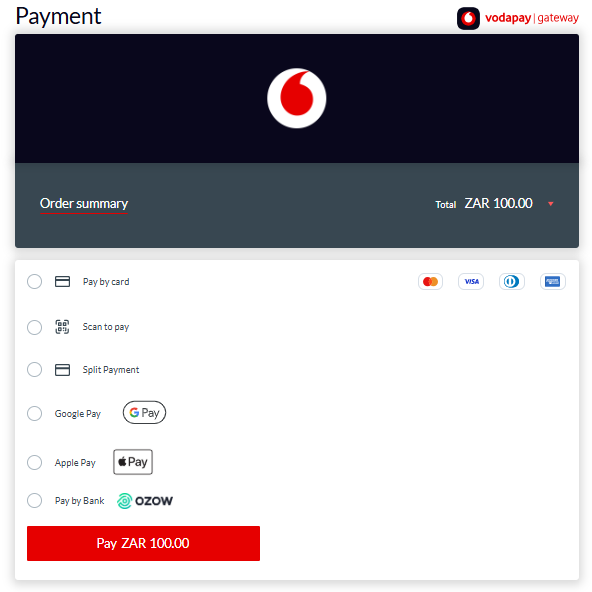
Fixed payment
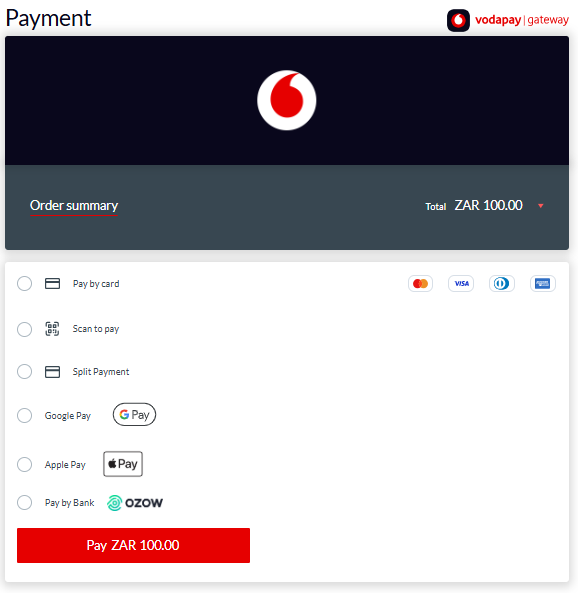
Fixed payment allows you to send a payment request for a specific amount to your customer.
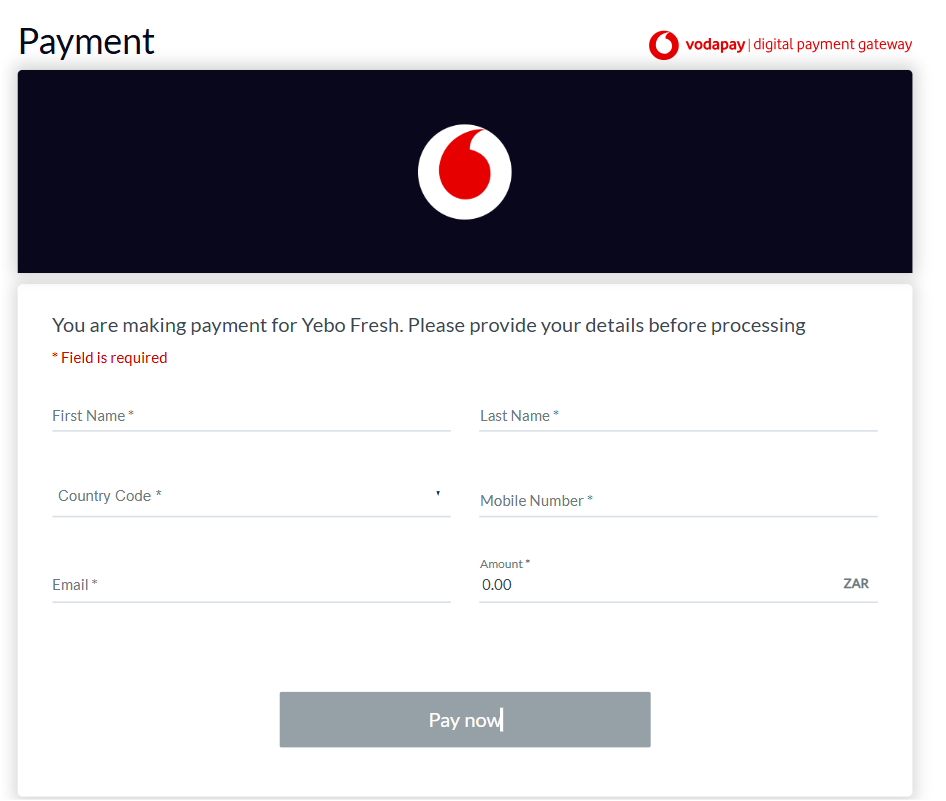
Variable payment
Variable payment allows you to send a payment request where your customer can opt to pay any amount.
Step 2 - Test with Bank Test Cards
Sandbox Testing
Use our sandbox to test your integration before going live
Find Out MoreBank Test Cards for UAT environment
Contact vfsintegration@vodacom.co.za to get a list of cards to test with.
This is for testing transactions that will go to the bank's testing environment
Step 3 - Receive notification message via webhook
Additionally, a notification message is sent to a preconfigured - publicly accessible - Url, reporting the outcome of the payment journey.
The VodaPay Gateway system embeds assurance data in the notification message when sending it to the integrating e-commerce system. This provides a guarantee that the notification message has not been tampered with and allows the integrating e-commerce system to authenticate the message.
Webhook Notification Example
{
    "echoData": "123",
    "transmissionDateTime": "2024-11-14T09:10:24+0000",
    "paymentToken": "00000000-0000-0000-0000-000000000000",
    "paymentReference": "00000000-0000-0000-0000-000000000000",
    "sessionId": "00000000-0000-0000-0000-000000000000",
    "responseCode": "00",
    "responseMessage": "PURCHASED",
    "retrievalReferenceNumber": "348934893489",
    "retrievalReferenceNumberExtended": "MERCH383483489",
    "merchantId": "VPS000000000000",
    "merchantName": "Test Merchant",
    "transactionAmount": 50000,
    "currencyCode": "710",
    "transactionId": "00000000-0000-0000-0000-000000000000",
    "assuranceData": "62A04A843B74A81F8152E34580242257FA22DF820652429852C4B6DA655F72FC06827829C5D5E2D7D33CA742FE9B475ED9856C06FCDF41E947E734D08ABE3032",
    "transactionInfo": { "paymentMethodCode": "06" }
}
Notification Response Parameters
- echoData
- transmissionDateTime
- paymentToken
- paymentReference
- sessionId
- responseCode
- responseMessage
- retrievalReferenceNumber
- retrievalReferenceNumberExtended
- merchantId
- merchantName
- transactionAmount
- currencyCode
- transactionId
- assuranceData
- transactionInfo
- paymentMethodCode
echoDatastringOptional
Any value that needs to be echoed back in the Echo Data element of the response message. This value will also be echoed in the resulting notification messages and the message posted to the callback URL. If unfilled, defaults to null over an empty string.
transmissionDateTimestring, 24 charRequired
The date and time (in UTC) when the message was sent, in ISO 8601 format (YYYY-MM-DDThh:mm:ss±hh:mm)
paymentTokenstring, ..36Required
The payment token identifier. Found on the notifications or callback url data.
paymentReferencestring, ..36Required
The payment reference. Found on the notifications or callback url data.
sessionIdstring, 36 charRequired
A UUID value identifying the session.
responseCodestring, char 2Required
A two-character code identifying the outcome of the request. Refer to the appendix for a list of response codes.
responseMessagestring, 12..99 charRequired
A longer description of the outcome of the request.
retrievalReferenceNumberstring, 12 charRequired
A unique identifier used by the system for transaction tracing purposes.
retrievalReferenceNumberExtendedstring, ..99 charRequired
An additional field for carrying reference information.
merchantIdstring, 15 charRequired
A code identifying the merchant that performs the transaction.
merchantNamestring, ..40 charOptional
The name under which the merchant is trading.
transactionAmountintegerRequired
The amount of the transaction in minor currency (integer number of cents).
currencyCodestring, 3 charRequired
The three-digit ISO 4217 code identifying the currency in which the transaction is being made.
transactionIdstring, 36 charRequired
A UUID value that uniquely identifies the transaction
assuranceDatastring, ..2000Required
Refer to the section on Assurance Data on the Security page for details of this data element.
transactionInfoobjectRequired
paymentMethodCodestring, 2 numberRequired
This code identifies the payment method used for the payment:
06 = Card
07 = OZOW
08 = Masterpass (QR code).
09 = SplitPayment.
Initiate
This API call initiates and configures a payment request link which is sent to a customer's via email or SMS. Depending on the type of payment request that you want to create, select either
- Fixed Payment - allows you to send a payment request for a specific amount to your customer
- Variable Payment - allows you to send a payment request where your customer can opt to pay any amount
- Request
- Response
- Notification API
Request
{
  "echoData": "PaymentRequest1",
  "customerId": "customer01",
  "variableAmount": false,
  "notifications": {
      "notificationUrl": "https://www.merchant.com/notify"
  },
  "transactionReference" : "Product/Service",
  "amount":10000,
  "expiryDate": "2026-07-27",
  "communication": {
      "firstName":"test",
      "lastName":"test",
      "msisdn": "27721234567",
      "emailAddress": "xxxx@xxxx.com"
  }
}
Request Parameters
- echoData
- customerId
- variableAmount
- notifications
- notificationUrl
- transactionReference
- amount
- expiryDate
- communication
- firstName
- lastName
- msisdn
- emailAddress
echoDatastringOptional
Any value that needs to be echoed back in the Echo Data element of the response message. This value will also be echoed in the resulting notification messages and the message posted to the callback URL. If unfilled, defaults to null over an empty string.
customerIdstring, 1..255 charOptional
A value that uniquely identifies the transacting customer.
variableAmountbooleanOptional
This is a boolean value that determines if the payment is a variable or fixed payment. Defaults to false i.e fixed payment.
notificationsobjectOptional
Please note all URLs must be https
notificationUrlstring, ..255 charOptional
A URL to which the result of the payment will be sent to notify the integrating party of the result of the API call. If unfilled default to null over an empty string.
transactionReferencestring, ..99 charRequired
A short product description of the item
amountintegerConditional
The amount of the transaction in minor currency (integer number of cents). This param is Mandatory for fixed payment.
expiryDatestring, 10 charOptional
The date when the issued Payment Request link expires (YYYY-MM-DD)
communicationstringOptional
Defines the destination for sending the payment request link.
firstNamestring, ..99 charOptional
Shows the recipient's first name in email interactions.
lastNamestring, ..99 charOptional
Shows the recipient's last name in email interactions.
msisdnstring, ..11 charOptional
The phone number to which the SMS will be sent. It must include the country code without the '+' sign. Used to send a payment request.
emailAddressstring, ..99 charOptional
The email address to which the payment URL will be sent.
Response
{
    "succeeded": true,
    "data": {
        "echoData": "PaymentRequest1",
        "responseCode": "00",
        "responseMessage": "Approved or completed successfully",
        "transmissionDateTime": "2025-05-02T14:47:31.3819403+00:00",
        "sessionId": "488417e5-fb50-4454-9fb5-0a3bf4c2d3db",
        "transactionId": "af6a001c-836e-4c93-84ee-689007911dea",
        "initiationUrl": "https://paypage.sandbox.vodapaygateway.vodacom.co.za/one-link?invoiceRef=af6a001c-836e-4c93-84ee-689007911dea"
        "paymentRequestReference": "af6a001c-836e-4c93-84ee-689007911dea",
    }
}
Response Parameters
- succeeded
- data
- echoData
- responseCode
- responseMessage
- transmissionDateTime
- sessionId
- transactionId
- initiationUrl
- paymentRequestReference
succeededbooleanRequired
A boolean that is either true or false depending on the outcome of the request.
dataobjectRequired
echoDatastringOptional
Any value that needs to be echoed back in the Echo Data element of the response message. This value will also be echoed in the resulting notification messages and the message posted to the callback URL. If unfilled, defaults to null over an empty string.
responseCodestring, char 2Required
A two-character code identifying the outcome of the request. Refer to the appendix for a list of response codes.
responseMessagestring, 12..99 charRequired
A longer description of the outcome of the request.
transmissionDateTimestring, 24 charRequired
The date and time (in UTC) when the message was sent, in ISO 8601 format (YYYY-MM-DDThh:mm:ss±hh:mm)
sessionIdstring, 36 charRequired
A UUID value identifying the session.
transactionIdstring, 36 charRequired
A UUID value that uniquely identifies the transaction
initiationUrlstring, ..255 charRequired
The URL from which the requesting session originated.
This must be executed within the browser to initiate the payment.
paymentRequestReferencestring, 36 charRequired
A value in UUID format that identifies the payment reference
Notification API
{
    "echoData": "123",
    "transmissionDateTime": "2024-11-14T09:10:24+0000",
    "sessionId": "00000000-0000-0000-0000-000000000000",
    "responseCode": "00",
    "responseMessage": "PURCHASED",
    "retrievalReferenceNumber": "348934893489",
    "retrievalReferenceNumberExtended": "MERCH383483489",
    "merchantId": "VPS000000000000",
    "merchantName": "Test Merchant",
    "transactionAmount": 50000,
    "currencyCode": "710",
    "transactionId": "00000000-0000-0000-0000-000000000000",
    "assuranceData": "62A04A843B74A81F8152E34580242257FA22DF820652429852C4B6DA655F72FC06827829C5D5E2D7D33CA742FE9B475ED9856C06FCDF41E947E734D08ABE3032",
    "transactionInfo": { "paymentMethodCode": "06" }
}
Notification Response Parameters
- echoData
- transmissionDateTime
- paymentReferences
- reference
- amount
- sessionId
- responseCode
- responseMessage
- retrievalReferenceNumber
- retrievalReferenceNumberExtended
- merchantId
- merchantName
- transactionAmount
- currencyCode
- transactionId
- assuranceData
- transactionInfo
- paymentMethodCode
echoDatastringOptional
Any value that needs to be echoed back in the Echo Data element of the response message. This value will also be echoed in the resulting notification messages and the message posted to the callback URL. If unfilled, defaults to null over an empty string.
transmissionDateTimestring, 24 charRequired
The date and time (in UTC) when the message was sent, in ISO 8601 format (YYYY-MM-DDThh:mm:ss±hh:mm)
paymentReferencesobjectConditional
The payment references. Found on the notifications or callback url data for split payments.
referencestring, ..36Required
The payment reference. Found on the notifications or callback url data.
amountintegerRequired
The amount of the transaction in minor currency (integer number of cents).
sessionIdstring, 36 charRequired
A UUID value identifying the session.
responseCodestring, char 2Required
A two-character code identifying the outcome of the request. Refer to the appendix for a list of response codes.
responseMessagestring, 12..99 charRequired
A longer description of the outcome of the request.
retrievalReferenceNumberstring, 12 charRequired
A unique identifier used by the system for transaction tracing purposes.
retrievalReferenceNumberExtendedstring, ..99 charRequired
An additional field for carrying reference information.
merchantIdstring, 15 charRequired
A code identifying the merchant that performs the transaction.
merchantNamestring, ..40 charOptional
The name under which the merchant is trading.
transactionAmountintegerRequired
The amount of the transaction in minor currency (integer number of cents).
currencyCodestring, 3 charRequired
The three-digit ISO 4217 code identifying the currency in which the transaction is being made.
transactionIdstring, 36 charRequired
A UUID value that uniquely identifies the transaction
assuranceDatastring, ..2000Required
Refer to the section on Assurance Data on the Security page for details of this data element.
transactionInfoobjectRequired
paymentMethodCodestring, 2 numberRequired
This code identifies the payment method used for the payment:
06 = Card
07 = OZOW
08 = Masterpass (QR code).
09 = SplitPayment.
Resend
The Resend API enables the initiated request to be resent.
- Request
- Response
Request
{
    "echoData": "PaymentRequest1",
    "transactionId": "3b6e6ac7-d984-421b-9d5e-55b6ee65cdbb",
    "expiryDate": "2025-07-17",
    "emailAddress": "test@customer.com",
    "msisdn": "27000000000",
    "paymentRequestReference": "3b6e6ac7-d984-421b-9d5e-55b6ee65cdbb"
}
Request Parameters
echoDatastringOptional
Any value that needs to be echoed back in the Echo Data element of the response message. This value will also be echoed in the resulting notification messages and the message posted to the callback URL. If unfilled, defaults to null over an empty string.
transactionIdstring, 36 charRequired
A UUID value that uniquely identifies the transaction
expiryDatestring, 10 charConditional
The date when the issued Payment Request link expires (YYYY-MM-DD). Mandatory when resending a fixed payment request.
emailAddressstring, ..99 charOptional
The email address to which the payment URL will be sent.
msisdnstring, ..11 charOptional
The phone number to which the SMS will be sent. It must include the country code without the '+' sign. Used to send a payment request.
paymentRequestReferencestringRequired
Use the corresponding payment reference value returned in the Initiate Response.
Response
   {
    "succeeded": true,
    "data": {
        "echoData": "PaymentRequest1",
        "responseCode": "00",
        "responseMessage": "Approved or completed successfully",
        "transmissionDateTime": "2025-05-02T14:47:31.3819403+00:00",
        "sessionId": "93ec5961-beb0-44e6-b97c-a43dce494616",
        "transactionId": "3b6e6ac7-d984-421b-9d5e-55b6ee65cdbb"
    }
}
Response Parameters
succeededbooleanRequired
A boolean that is either true or false depending on the outcome of the request.
dataobjectRequired
echoDatastringOptional
Any value that needs to be echoed back in the Echo Data element of the response message. This value will also be echoed in the resulting notification messages and the message posted to the callback URL. If unfilled, defaults to null over an empty string.
responseCodestring, char 2Required
A two-character code identifying the outcome of the request. Refer to the appendix for a list of response codes.
responseMessagestring, 12..99 charRequired
A longer description of the outcome of the request.
transmissionDateTimestring, 24 charRequired
The date and time (in UTC) when the message was sent, in ISO 8601 format (YYYY-MM-DDThh:mm:ss±hh:mm)
sessionIdstring, 36 charRequired
A UUID value identifying the session.
transactionIdstring, 36 charRequired
A UUID value that uniquely identifies the transaction
Cancel
The Cancel API enables the initiated request to be cancelled.
- Request
- Response
Request
{
    "echoData": "PaymentRequest1",
    "transactionId": "3b6e6ac7-d984-421b-9d5e-55b6ee65cdbb",
    "paymentRequestReference": "3b6e6ac7-d984-421b-9d5e-55b6ee65cdbb"
}
Request Parameters
echoDatastringOptional
Any value that needs to be echoed back in the Echo Data element of the response message. This value will also be echoed in the resulting notification messages and the message posted to the callback URL. If unfilled, defaults to null over an empty string.
transactionIdstring, 36 charRequired
A UUID value that uniquely identifies the transaction
paymentRequestReferencestringRequired
Use the corresponding payment reference value returned in the Initiate Response.
Response
   {
    "succeeded": true,
    "data": {
        "echoData": "PaymentRequest1",
        "responseCode": "00",
        "responseMessage": "Approved or completed successfully",
        "transmissionDateTime": "2025-05-02T14:47:31.3819403+00:00",
        "sessionId": "93ec5961-beb0-44e6-b97c-a43dce494616",
        "transactionId": "3b6e6ac7-d984-421b-9d5e-55b6ee65cdbb"
    }
}
Response Parameters
succeededbooleanRequired
A boolean that is either true or false depending on the outcome of the request.
dataobjectRequired
echoDatastringOptional
Any value that needs to be echoed back in the Echo Data element of the response message. This value will also be echoed in the resulting notification messages and the message posted to the callback URL. If unfilled, defaults to null over an empty string.
responseCodestring, char 2Required
A two-character code identifying the outcome of the request. Refer to the appendix for a list of response codes.
responseMessagestring, 12..99 charRequired
A longer description of the outcome of the request.
transmissionDateTimestring, 24 charRequired
The date and time (in UTC) when the message was sent, in ISO 8601 format (YYYY-MM-DDThh:mm:ss±hh:mm)
sessionIdstring, 36 charRequired
A UUID value identifying the session.
transactionIdstring, 36 charRequired
A UUID value that uniquely identifies the transaction