Version 2.0
Overview
How to quickly get started using the VodaPay Gateway.
https://api.vodapaygatewayuat.vodacom.co.za/v2/
https://api.vodapaygateway.vodacom.co.za/v2/
VodaPay Gateway will supply you with the following:
- Your API key - sent in the header value for the purposes of authentication and authorisation.
- Once onboarded, you can locate your API key under your profile on the merchant portal - link provided below
https://vodapayqa.vodacom.co.za/merchant
https://vodapay.vodacom.co.za/merchant
Step-by-step process
Step 1 - Choose Payment Type
What type of payment are you looking for?
- Once-off payment
- Recurring payment
Once-off payment
Receive payments without having to redirect customers away from your e-commerce website.
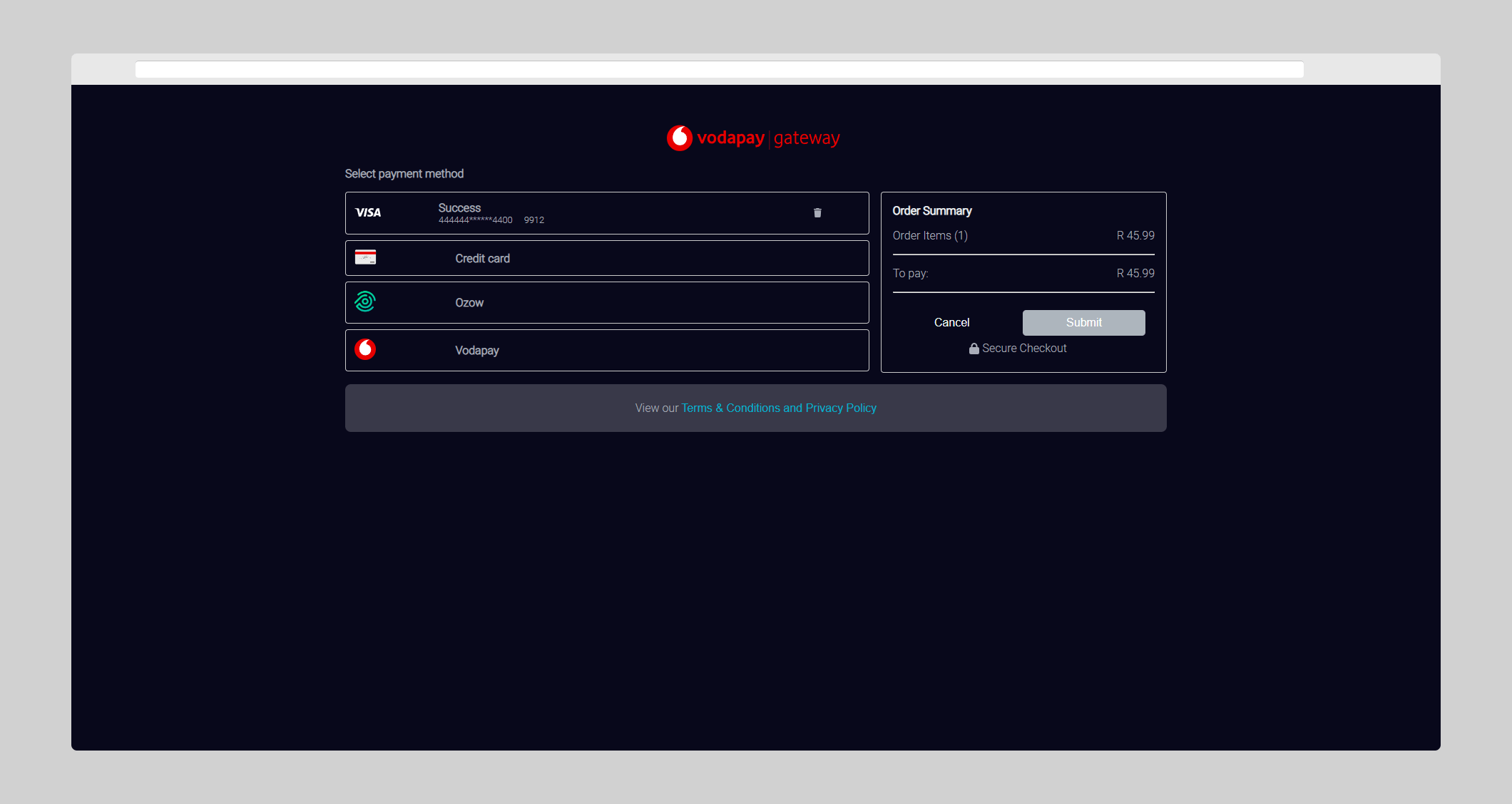
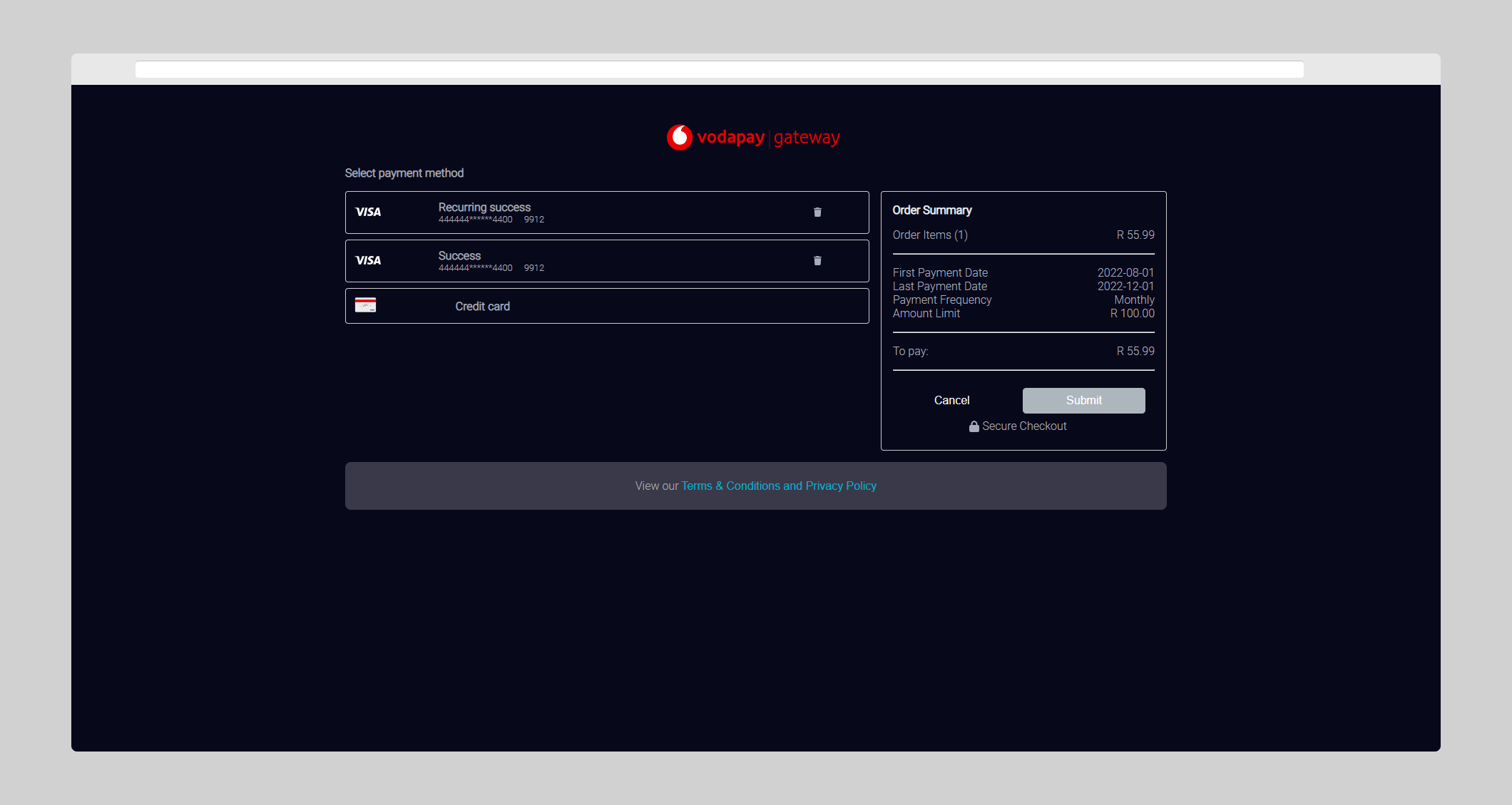
Step 2 - Test with Bank Test Cards
Sandbox Testing
Use our sandbox to test your integration before going live
Find Out MoreBank Test Cards for UAT environment
Contact vfsintegration@vodacom.co.za to get a list of cards to test with.
This is for testing transactions that will go to the bank's testing environment
Step 3 - Receive Callback URL responses
Once the payment journey is complete, whether successful or declined, the outcome of the transaction is redirected to the callback URL that was specified within the payment request message. This informs the customer of the outcome of the transaction.
The callback URL will include a Base64 JSON GET parameter named data.
Callback Example
The following examples show responses sent to the callback URL:
- Successful/Failed
- Session Timeout
Successful/Failed
https://www.merchant.com/done?data=ewogICJlY2hvRGF0YSI6ICIxMjMiLAogICJzZXNzaW9uSWQiOiAiMDAwMDAwMDAtMDAwMC0wMDAwLTAwMDAtMDAwMDAwMDAwMDAwIiwKICAicmVzcG9uc2VDb2RlIjogIjAwIiwKICAicmVzcG9uc2VNZXNzYWdlIjogIkFwcHJvdmVkIG9yIGNvbXBsZXRlZCBzdWNjZXNzZnVsbHkiLAogICJwYXltZW50VG9rZW4iOiAiMDAwMDAwMDAwMDAwMDAwMCIsCiAgInJldHJpZXZhbFJlZmVyZW5jZU51bWJlciI6ICIwMDAwMDAwMDAwMDAiLAogICJyZXRyaWV2YWxSZWZlcmVuY2VOdW1iZXJFeHRlbmRlZCI6ICIwMDAwMDAwMDAwMDAwMCIsCiAgIm1lcmNoYW50SWQiOiAiVlBTMDAwMDAwMDAwMDAwIiwKICAibWVyY2hhbnROYW1lIjogIlRlc3QgTWVyY2hhbnQiLAogICJ0cmFuc2FjdGlvbkFtb3VudCI6IDUwMDAwLAogICJjdXJyZW5jeUNvZGUiOiAiNzEwIiwKICAidHJhbnNhY3Rpb25JZCI6ICIwMDAwMDAwMC0wMDAwLTAwMDAtMDAwMC0wMDAwMDAwMDAwMDAiLAogICJwYXltZW50TWV0aG9kIjogIjA2Igp9
{
"echoData": "123",
"sessionId": "00000000-0000-0000-0000-000000000000",
"responseCode": "00",
"responseMessage": "Approved or completed successfully",
"paymentToken": "0000000000000000",
"retrievalReferenceNumber": "000000000000",
"retrievalReferenceNumberExtended": "00000000000000",
"merchantId": "VPS000000000000",
"merchantName": "Test Merchant",
"transactionAmount": 50000,
"currencyCode": "710",
"transactionId": "00000000-0000-0000-0000-000000000000",
"paymentMethod": "06"
}
Base64 Decoded Parameters
- echoData
- sessionId
- responseCode
- responseMessage
- paymentToken
- retrievalReferenceNumber
- retrievalReferenceNumberExtended
- merchantId
- merchantName
- transactionAmount
- currencyCode
- transactionId
- paymentMethodCode
echoDatastringOptional
Any value that needs to be echoed back in the Echo Data element of the response message. This value will also be echoed in the resulting notification messages and the message posted to the callback URL. If unfilled, defaults to null over an empty string.
sessionIdstring, 36 charRequired
A UUID value identifying the session.
responseCodestring, char 2Required
A two-character code identifying the outcome of the request. Refer to the appendix for a list of response codes.
responseMessagestring, 12..99 charRequired
A longer description of the outcome of the request.
paymentTokenstring, ..36Required
The payment token identifier. Found on the notifications or callback url data.
retrievalReferenceNumberstring, 12 charRequired
A unique identifier used by the system for transaction tracing purposes.
retrievalReferenceNumberExtendedstring, ..99 charRequired
An additional field for carrying reference information.
merchantIdstring, 15 charRequired
A code identifying the merchant that performs the transaction.
merchantNamestring, ..40 charOptional
The name under which the merchant is trading.
transactionAmountintegerRequired
The amount of the transaction in minor currency (integer number of cents).
currencyCodestring, 3 charRequired
The three-digit ISO 4217 code identifying the currency in which the transaction is being made.
transactionIdstring, 36 charRequired
A UUID value that uniquely identifies the transaction
paymentMethodCodestring, 2 numberRequired
This code identifies the payment method used for the payment:
06 = Card
07 = OZOW
08 = Masterpass (QR code).
Note that notifications will not be sent for OZOW transactions.
Session Timeout
https://www.merchant.com/done?data=ew0KICAiZWNob0RhdGEiOiAiMTIzIiwNCiAgInNlc3Npb25JZCI6ICIwMDAwMDAwMC0wMDAwLTAwMDAtMDAwMC0wMDAwMDAwMDAwMDAiLA0KICAicmVzcG9uc2VDb2RlIjogIjA2IiwNCiAgInJlc3BvbnNlTWVzc2FnZSI6ICJZb3VyIHNlc3Npb24gaGFzIGV4cGlyZWQgZHVlIHRvIGluYWN0aXZpdHkuICBQbGVhc2UgcmV0cnkgdHJhbnNhY3Rpb24uIn0sDQp9
{
"echoData": "123",
"sessionId": "00000000-0000-0000-0000-000000000000",
"responseCode": "06",
"responseMessage": "Your session has expired due to inactivity.  Please retry transaction."
}
Base64 Decoded Parameters
echoDatastringOptional
Any value that needs to be echoed back in the Echo Data element of the response message. This value will also be echoed in the resulting notification messages and the message posted to the callback URL. If unfilled, defaults to null over an empty string.
sessionIdstring, 36 charRequired
A UUID value identifying the session.
responseCodestring, char 2Required
A two-character code identifying the outcome of the request. Refer to the appendix for a list of response codes.
responseMessagestring, 12..99 charRequired
A longer description of the outcome of the request.
Step 4 - Receive notification message via webhook
Additionally, a notification message is sent to a preconfigured - publicly accessible - Url, reporting the outcome of the payment journey.
The VodaPay Gateway system embeds assurance data in the notification message when sending it to the integrating e-commerce system. This provides a guarantee that the notification message has not been tampered with and allows the integrating e-commerce system to authenticate the message.
Webhook Notification Example
{
    "echoData": "123",
    "transmissionDateTime": "2020-08-26T09:10:24+0000",
    "paymentToken": "8483893489348934",
    "sessionId": "00000000-0000-0000-0000-000000000000",
    "responseCode": "00",
    "responseMessage": "Approved or completed successfully",
    "retrievalReferenceNumber": "348934893489",
    "retrievalReferenceNumberExtended": "MERCH383483489",
    "merchantId": "VPS000000000000",
    "merchantName": "Test Merchant",
    "transactionAmount": 50000,
    "currencyCode": "710",
    "transactionId": "00000000-0000-0000-0000-000000000000",
    "assuranceData": "62A04A843B74A81F8152E34580242257FA22DF820652429852C4B6DA655F72FC06827829C5D5E2D7D33CA742FE9B475ED9856C06FCDF41E947E734D08ABE3032",
    "transactionInfo": { "paymentMethodCode": "06" }
}
Notification Response Parameters
- echoData
- transmissionDateTime
- paymentToken
- sessionId
- responseCode
- responseMessage
- retrievalReferenceNumber
- retrievalReferenceNumberExtended
- merchantId
- merchantName
- transactionAmount
- currencyCode
- transactionId
- assuranceData
- transactionInfo
- paymentMethodCode
echoDatastringOptional
Any value that needs to be echoed back in the Echo Data element of the response message. This value will also be echoed in the resulting notification messages and the message posted to the callback URL. If unfilled, defaults to null over an empty string.
transmissionDateTimestring, 24 charRequired
The date and time (in UTC) when the message was sent, in ISO 8601 format (YYYY-MM-DDThh:mm:ss±hh:mm)
paymentTokenstring, ..36Required
The payment token identifier. Found on the notifications or callback url data.
sessionIdstring, 36 charRequired
A UUID value identifying the session.
responseCodestring, char 2Required
A two-character code identifying the outcome of the request. Refer to the appendix for a list of response codes.
responseMessagestring, 12..99 charRequired
A longer description of the outcome of the request.
retrievalReferenceNumberstring, 12 charRequired
A unique identifier used by the system for transaction tracing purposes.
retrievalReferenceNumberExtendedstring, ..99 charRequired
An additional field for carrying reference information.
merchantIdstring, 15 charRequired
A code identifying the merchant that performs the transaction.
merchantNamestring, ..40 charOptional
The name under which the merchant is trading.
transactionAmountintegerRequired
The amount of the transaction in minor currency (integer number of cents).
currencyCodestring, 3 charRequired
The three-digit ISO 4217 code identifying the currency in which the transaction is being made.
transactionIdstring, 36 charRequired
A UUID value that uniquely identifies the transaction
assuranceDatastring, ..2000Required
Refer to the section on Assurance Data on the Security page for details of this data element.
transactionInfoobjectRequired
paymentMethodCodestring, 2 numberRequired
This code identifies the payment method used for the payment:
06 = Card
07 = OZOW
08 = Masterpass (QR code).
Note that notifications will not be sent for OZOW transactions.
Once-Off
Initiate - Immediate or Delayed
When a customer proceeds to pay for a purchase on an e-commerce site, an Once-Off Payment API call is made to the VodaPay Gateway containing information that identifies the merchant, reference information, transaction amount, and so on. The VodaPay Gateway performs various verifications on the data. If these are passed successfully, it responds with an initiation URL to which the integrator must redirect.
Initiates a once-off payment. This call sets up a once-off payment for a merchant and returns a link initiationUrl to a "payment page" on which a customer can capture their payment details.
After the payment is authorised, the notificationUrl will be invoked with the outcome of the payment; and the payment page will redirect the user to the callbackUrl.
Once-off payments can be "immediate" or "delayed". Immediate payments execute both a payment authorisation and payment settlement in the same call. This can be achieved by setting delaySettlement = false.
Delayed payments are initiated by calling this endpoint with delaySettlement = true. This performs the payment authorisation only. The payment can be completed by a different API call before midnight on the same day.
In addition to the initiationUrl payment page being returned to the merchant, this call can be sent to the customer, in the form of an SMS or Email, by specifying settings in the communication property. This can be used to produce "payment requests" or "payment links" for both immediate and delayed once-off payments.
- Request
- Response
- Callback URL
- Notification API
- Try it out!
Request
{
  "echoData": "123",
  "traceId": "00000000000100001",
  "amount": 50000,
  "customerId": "customer01",
  "digitalWalletId": "00000000-0000-0000-0000-000000000000",
  "additionalData": "OPCD;3343",
  "delaySettlement": false,
  "basket": [
    {
      "lineNumber": "1",
      "Id": "vod50",
      "barcode": "232323232",
      "quantity": 1,
      "description": "Vodacom R50 Voucher",
      "amountExVAT": 42500,
      "amountVAT": 7500
    }
  ],
  "notifications": {
    "callbackUrl": "https://www.merchant.com/done",
    "notificationUrl": "https://www.merchant.com/notify"
  },
   "styling": {
    "logoUrl": "https://www.merchant.com/logo.png",
    "bannerUrl": "https://www.merchant.com/message.png",
    "theme": 0
  },
  "electronicReceipt": {
    "method": 0,
    "address": "27721234567"
  },
  "communication": {
    "msisdn": "27721234567",
    "emailAddress": "xxxx@xxxx.com",
    "message": "To make your payment please go the the following url: *{PaymentUrl}*"
  }
}
Request Parameters
- echoData
- traceId
- amount
- customerId
- digitalWalletId
- additionalData
- delaySettlement
- basket
- lineNumber
- id
- barcode
- quantity
- description
- amountExVAT
- amountVAT
- notifications
- callbackUrl
- notificationUrl
- styling
- logoUrl
- bannerUrl
- theme
- electronicReceipt
- method
- address
- communication
- msisdn
- emailAddress
- message
echoDatastringOptional
Any value that needs to be echoed back in the Echo Data element of the response message. This value will also be echoed in the resulting notification messages and the message posted to the callback URL. If unfilled, defaults to null over an empty string.
traceIdstring, 12..99 charRequired
A unique identifier used by the system for transaction tracing purposes. This value must only be alphanumeric.
amountintegerRequired
The amount of the transaction in minor currency (integer number of cents). This value can be lower than the original purchase amount, but may not be higher than the purchase amount.
customerIdstring, 1..255 charConditional
A value that uniquely identifies the transacting customer.
digitalWalletIdstring, 36 charConditional
A value in UUID format that identifies the transacting customer. Only used if an existing digital wallet id exists.
additionalDatastring, ..9999 charOptional
Any other data required for the transaction using the VodaPay Gateway Additional Data Token format.Further tokens may be introduced in the future. If unfilled default to null over an empty string.
delaySettlementbooleanRequired
A value in UUID format that identifies the transacting customer. Only used if an existing digital wallet id exists.This is a boolean value that determines if the payment is an immediate payment or a delayed payment.
basketstring, ..9999 charOptional
Any other data required for the transaction using the VodaPay Gateway Additional Data Token format.Further tokens may be introduced in the future. If unfilled default to null over an empty string.
lineNumberstringRequired
A sequential identifier specifying the order in which the invoice item appears in the basket.
idstring, ..99 charRequired
The identifier of the invoice item.
barcodestring, ..99 charRequired
An SKU or PLU code associated with the product.
quantityintegerRequired
This specifies how many of this specific item the customer has ordered.
descriptionstring, ..99 charRequired
A short product description of the item
amountExVATintegerRequired
The price of the item, excluding VAT.
amountVATintegerRequired
The amount of VAT charged on the item.
notificationsobjectOptional
Please note all URLs must be https
callbackUrlstring, ..255 charOptional
A URL to which the response message, reporting the outcome, will be sent. If unfilled default to null over an empty string.
notificationUrlstring, ..255 charOptional
A URL to which the result of the payment will be sent to notify the integrating party of the result of the API call. If unfilled default to null over an empty string.
stylingobjectOptional
Please note all URLs must be https
logoUrlstring, ..255 charOptional
This URL links to the merchant's logo image, which will be embedded into the payment page. The recommended size is 300 pixels wide and 100 pixels high, although other sizes will be resized on rendering. If unfilled default to null over an empty string.
bannerUrlstring, ..255 charOptional
This URL links to an image of a message from the merchant, which will be embedded into the payment page. The recommended size is 300 pixels wide and 100 pixels high, although other sizes will be resized on rendering. If unfilled default to null over an empty string.
themeintegerOptional
This contains an identifier to specify a theme to be used for rendering the payment page and the pages for callback URLs where applicable.If the theme referenced by this field is missing, the default theme will be used.
The codes are as follows:
0 - Default Theme
2 - Mini Apps Theme
electronicReceiptobjectOptional
methodintegerOptional
This specifies the notification method that must be used in order to send the customer an e-receipt.
0 = SMS
1 = EMAIL
addressstring, ..255 charOptional
This specifies the address to which an e-receipt will be sent to based on the method value. This must contain either a mobile phone number, internationalised so that it starts with the country code, or a valid email address.
communicationobjectOptional
msisdnstring, ..11 charOptional
The number that the sms will be sent to. It must include the country code while excluding the +. If unfilled default to null over an empty string.
emailAddressstring, ..99 charOptional
The email address to which the payment URL will be sent.. If unfilled default to null over an empty string.
messagestring, ..50 charOptional
The message that will appear in the sms sent to the customer. Use the following term in the message where the url must appear: {PaymentUrl}. If unfilled default to null over an empty string.
Response
{
  "succeeded": true,
  "data": {
    "echoData": "123",
    "responseCode": "00",
    "responseMessage": "Approved or completed successfully",
    "transmissionDateTime": "2020-12-13T12:02:33+0000",
    "sessionId": "00000000-0000-0000-0000-000000000000",
    "transactionId": "00000000-0000-0000-0000-000000000000",
    "traceId": "00000000000100001",
    "initiationUrl": "https://www.pay.vodapaygateway.vodacom.co.za/pay?sessionId=00000000-0000-0000-0000-000000000000"
  }
}
Response Parameters
- succeeded
- echoData
- responseCode
- responseMessage
- transmissionDateTime
- sessionId
- transactionId
- traceId
- initiationUrl
succeededbooleanRequired
A boolean that is either true or false depending on the outcome of the request.
echoDatastringOptional
Any value that needs to be echoed back in the Echo Data element of the response message. This value will also be echoed in the resulting notification messages and the message posted to the callback URL. If unfilled, defaults to null over an empty string.
responseCodestring, char 2Required
A two-character code identifying the outcome of the request. Refer to the appendix for a list of response codes.
responseMessagestring, 12..99 charRequired
A longer description of the outcome of the request.
transmissionDateTimestring, 24 charRequired
The date and time (in UTC) when the message was sent, in ISO 8601 format (YYYY-MM-DDThh:mm:ss±hh:mm)
sessionIdstring, 36 charRequired
A UUID value identifying the session.
transactionIdstring, 36 charRequired
A UUID value that uniquely identifies the transaction
traceIdstring, 12..99 charRequired
A unique identifier used by the system for transaction tracing purposes. This value must only be alphanumeric.
initiationUrlstring, ..255 charRequired
The URL from which the requesting session originated.
This must be executed within the browser to initiate the payment.
Callback URL
- Successful/Failed
- Session Timeout
Successful/Failed
https://www.merchant.com/done?data=ewogICJlY2hvRGF0YSI6ICIxMjMiLAogICJzZXNzaW9uSWQiOiAiMDAwMDAwMDAtMDAwMC0wMDAwLTAwMDAtMDAwMDAwMDAwMDAwIiwKICAicmVzcG9uc2VDb2RlIjogIjAwIiwKICAicmVzcG9uc2VNZXNzYWdlIjogIkFwcHJvdmVkIG9yIGNvbXBsZXRlZCBzdWNjZXNzZnVsbHkiLAogICJwYXltZW50VG9rZW4iOiAiMDAwMDAwMDAwMDAwMDAwMCIsCiAgInJldHJpZXZhbFJlZmVyZW5jZU51bWJlciI6ICIwMDAwMDAwMDAwMDAiLAogICJyZXRyaWV2YWxSZWZlcmVuY2VOdW1iZXJFeHRlbmRlZCI6ICIwMDAwMDAwMDAwMDAwMCIsCiAgIm1lcmNoYW50SWQiOiAiVlBTMDAwMDAwMDAwMDAwIiwKICAibWVyY2hhbnROYW1lIjogIlRlc3QgTWVyY2hhbnQiLAogICJ0cmFuc2FjdGlvbkFtb3VudCI6IDUwMDAwLAogICJjdXJyZW5jeUNvZGUiOiAiNzEwIiwKICAidHJhbnNhY3Rpb25JZCI6ICIwMDAwMDAwMC0wMDAwLTAwMDAtMDAwMC0wMDAwMDAwMDAwMDAiLAogICJwYXltZW50TWV0aG9kIjogIjA2Igp9
{
"echoData": "123",
"sessionId": "00000000-0000-0000-0000-000000000000",
"responseCode": "00",
"responseMessage": "Approved or completed successfully",
"paymentToken": "0000000000000000",
"retrievalReferenceNumber": "000000000000",
"retrievalReferenceNumberExtended": "00000000000000",
"merchantId": "VPS000000000000",
"merchantName": "Test Merchant",
"transactionAmount": 50000,
"currencyCode": "710",
"transactionId": "00000000-0000-0000-0000-000000000000",
"paymentMethod": "06"
}
Base64 Decoded Parameters
- echoData
- sessionId
- responseCode
- responseMessage
- paymentToken
- retrievalReferenceNumber
- retrievalReferenceNumberExtended
- merchantId
- merchantName
- transactionAmount
- currencyCode
- transactionId
- paymentMethodCode
echoDatastringOptional
Any value that needs to be echoed back in the Echo Data element of the response message. This value will also be echoed in the resulting notification messages and the message posted to the callback URL. If unfilled, defaults to null over an empty string.
sessionIdstring, 36 charRequired
A UUID value identifying the session.
responseCodestring, char 2Required
A two-character code identifying the outcome of the request. Refer to the appendix for a list of response codes.
responseMessagestring, 12..99 charRequired
A longer description of the outcome of the request.
paymentTokenstring, ..36Required
The payment token identifier. Found on the notifications or callback url data.
retrievalReferenceNumberstring, 12 charRequired
A unique identifier used by the system for transaction tracing purposes.
retrievalReferenceNumberExtendedstring, ..99 charRequired
An additional field for carrying reference information.
merchantIdstring, 15 charRequired
A code identifying the merchant that performs the transaction.
merchantNamestring, ..40 charOptional
The name under which the merchant is trading.
transactionAmountintegerRequired
The amount of the transaction in minor currency (integer number of cents).
currencyCodestring, 3 charRequired
The three-digit ISO 4217 code identifying the currency in which the transaction is being made.
transactionIdstring, 36 charRequired
A UUID value that uniquely identifies the transaction
paymentMethodCodestring, 2 numberRequired
This code identifies the payment method used for the payment:
06 = Card
07 = OZOW
08 = Masterpass (QR code).
Note that notifications will not be sent for OZOW transactions.
Session Timeout
https://www.merchant.com/done?data=ew0KICAiZWNob0RhdGEiOiAiMTIzIiwNCiAgInNlc3Npb25JZCI6ICIwMDAwMDAwMC0wMDAwLTAwMDAtMDAwMC0wMDAwMDAwMDAwMDAiLA0KICAicmVzcG9uc2VDb2RlIjogIjA2IiwNCiAgInJlc3BvbnNlTWVzc2FnZSI6ICJZb3VyIHNlc3Npb24gaGFzIGV4cGlyZWQgZHVlIHRvIGluYWN0aXZpdHkuICBQbGVhc2UgcmV0cnkgdHJhbnNhY3Rpb24uIn0sDQp9
{
"echoData": "123",
"sessionId": "00000000-0000-0000-0000-000000000000",
"responseCode": "06",
"responseMessage": "Your session has expired due to inactivity.  Please retry transaction."
}
Base64 Decoded Parameters
echoDatastringOptional
Any value that needs to be echoed back in the Echo Data element of the response message. This value will also be echoed in the resulting notification messages and the message posted to the callback URL. If unfilled, defaults to null over an empty string.
sessionIdstring, 36 charRequired
A UUID value identifying the session.
responseCodestring, char 2Required
A two-character code identifying the outcome of the request. Refer to the appendix for a list of response codes.
responseMessagestring, 12..99 charRequired
A longer description of the outcome of the request.
Notification API
{
    "echoData": "123",
    "transmissionDateTime": "2020-08-26T09:10:24+0000",
    "paymentToken": "8483893489348934",
    "sessionId": "00000000-0000-0000-0000-000000000000",
    "responseCode": "00",
    "responseMessage": "Approved or completed successfully",
    "retrievalReferenceNumber": "348934893489",
    "retrievalReferenceNumberExtended": "MERCH383483489",
    "merchantId": "VPS000000000000",
    "merchantName": "Test Merchant",
    "transactionAmount": 50000,
    "currencyCode": "710",
    "transactionId": "00000000-0000-0000-0000-000000000000",
    "assuranceData": "62A04A843B74A81F8152E34580242257FA22DF820652429852C4B6DA655F72FC06827829C5D5E2D7D33CA742FE9B475ED9856C06FCDF41E947E734D08ABE3032",
    "transactionInfo": { "paymentMethodCode": "06" }
}
Notification Response Parameters
- echoData
- transmissionDateTime
- paymentToken
- sessionId
- responseCode
- responseMessage
- retrievalReferenceNumber
- retrievalReferenceNumberExtended
- merchantId
- merchantName
- transactionAmount
- currencyCode
- transactionId
- assuranceData
- transactionInfo
- paymentMethodCode
echoDatastringOptional
Any value that needs to be echoed back in the Echo Data element of the response message. This value will also be echoed in the resulting notification messages and the message posted to the callback URL. If unfilled, defaults to null over an empty string.
transmissionDateTimestring, 24 charRequired
The date and time (in UTC) when the message was sent, in ISO 8601 format (YYYY-MM-DDThh:mm:ss±hh:mm)
paymentTokenstring, ..36Required
The payment token identifier. Found on the notifications or callback url data.
sessionIdstring, 36 charRequired
A UUID value identifying the session.
responseCodestring, char 2Required
A two-character code identifying the outcome of the request. Refer to the appendix for a list of response codes.
responseMessagestring, 12..99 charRequired
A longer description of the outcome of the request.
retrievalReferenceNumberstring, 12 charRequired
A unique identifier used by the system for transaction tracing purposes.
retrievalReferenceNumberExtendedstring, ..99 charRequired
An additional field for carrying reference information.
merchantIdstring, 15 charRequired
A code identifying the merchant that performs the transaction.
merchantNamestring, ..40 charOptional
The name under which the merchant is trading.
transactionAmountintegerRequired
The amount of the transaction in minor currency (integer number of cents).
currencyCodestring, 3 charRequired
The three-digit ISO 4217 code identifying the currency in which the transaction is being made.
transactionIdstring, 36 charRequired
A UUID value that uniquely identifies the transaction
assuranceDatastring, ..2000Required
Refer to the section on Assurance Data on the Security page for details of this data element.
transactionInfoobjectRequired
paymentMethodCodestring, 2 numberRequired
This code identifies the payment method used for the payment:
06 = Card
07 = OZOW
08 = Masterpass (QR code).
Note that notifications will not be sent for OZOW transactions.
Try it out!
Request Body
Complete - Settle or Reversal
When a customer proceeds to pay for a purchase on an e-commerce site, an Once-Off Payment API call is made to the VodaPay Gateway containing information that identifies the merchant, reference information, transaction amount, and so on. The VodaPay Gateway performs various verifications on the data. If these are passed successfully, it responds with an initiation URL to which the integrator must redirect.
Complete (settle, or reverse) a delayed once-off payment.
During the payment journey for which a Once-Off Delayed Payment was initiated, the transaction is finalised only when the Complete Payment call has been completed. The Complete Payment call is only required if the Once-Off Delayed Payment call was approved.
The Complete Payment call sends an advice message to either settle the authorised transaction or reverse the transaction.
The Transaction ID is used together with the Merchant ID to locate the original transaction for which either a Financial Advice or a Reversal Advice will be sent. If the original transaction is not found, a response code of 25 is returned, meaning that no record was found.
- Request
- Response
- Try it out!
Request
  {
    "echoData": "123",
    "transactionId": "00000000-0000-0000-0000-000000000000",
    "action": 0
  }
Request Parameters
echoDatastringOptional
Any value that needs to be echoed back in the Echo Data element of the response message. This value will also be echoed in the resulting notification messages and the message posted to the callback URL. If unfilled, defaults to null over an empty string.
transactionIdstring, 36 charRequired
A UUID value that uniquely identifies the transaction
actionintegerRequired
Identifying the reason for the completion of the payment. The codes are as follows.
0 - Settle
1 - Reversal
Response
{
  "succeeded": true,
  "data": {
    "echoData": "123",
    "responseCode": "00",
    "responseMessage": "Approved or completed successfully",
    "transmissionDateTime": "2020-12-13T12:02:33+0000",
    "sessionId": "00000000-0000-0000-0000-000000000000",
    "transactionId": "00000000-0000-0000-0000-000000000000"
  }
}
Request Parameters
succeededbooleanRequired
A boolean that is either true or false depending on the outcome of the request.
dataobjectRequired
echoDatastringOptional
Any value that needs to be echoed back in the Echo Data element of the response message. This value will also be echoed in the resulting notification messages and the message posted to the callback URL. If unfilled, defaults to null over an empty string.
responseCodestring, char 2Required
A two-character code identifying the outcome of the request. Refer to the appendix for a list of response codes.
responseMessagestring, 12..99 charRequired
A longer description of the outcome of the request.
transmissionDateTimestring, 24 charRequired
The date and time (in UTC) when the message was sent, in ISO 8601 format (YYYY-MM-DDThh:mm:ss±hh:mm)
sessionIdstring, 36 charRequired
A UUID value identifying the session.
transactionIdstring, 36 charRequired
A UUID value that uniquely identifies the transaction
Try it out!
Request Body
Recurring
Initiate
This API call is used to initiate and set up recurring payments. When a customer proceeds to make the initial payment for a purchase of a service such as a recurring subscription on an e-commerce site, as well as lodge the recurring payment mandate, a recurring API call is made to the VodaPay Gateway containing information that identifies the merchant, reference information, transaction amount and recurring payment mandate.
The VodaPay Gateway performs various verifications on the data. If these are passed successfully, it responds with an initiation URL to which the integrator must redirect. A recurring payment token is generated and tied to the specified recurring payment mandate.
- Request
- Response
- Callback URL
- Notification API
- Try It Out!
Request
{
    "echoData": "123",
    "traceId": "00000000000100001",
    "amount": 50000,
    "customerId": "customer01",
    "digitalWalletId": "00000000-0000-0000-0000-000000000000",
    "additionalData": "OPCD;3343",
    "basket": [
        {
        "lineNumber": "1",
        "Id": "vod50",
        "barcode": "232323232",
        "quantity": 1,
        "description": "Vodacom R50 Voucher",
        "amountExVAT": 42500,
        "amountVAT": 7500
        }
    ],
    "Notifications": {
        "callbackUrl": "https://www.merchant.com/done",
        "notificationUrl": "https://www.merchant.com/notify"
    },
     "styling": {
        "logoUrl": "https://www.merchant.com/logo.png",
        "bannerUrl": "https://www.merchant.com/message.png",
        "theme": 0
    },
    "electronicReceipt": {
        "method": 0,
        "address": "27721234567"
    },
    "communication": {
        "msisdn": "27721234567",
        "emailAddress": "xxxx@xxxx.com",
         "message": "To make your payment please go the the following url: *{PaymentUrl}*"
    },
    "recurring": {
        "category": 2,
        "firstPaymentDate": "2021-04-01",
        "lastPaymentDate": "2023-04-01",
        "frequency": 6,
        "regularPaymentDay": 1,
        "amount": 20000,
        "amountLimit": 30000,
        "paymentInstrumentMinimumValidityPeriod": 3
    }
}
Request Parameters
- echoData
- traceId
- amount
- customerId
- digitalWalletId
- additionalData
- basket
- lineNumber
- id
- barcode
- quantity
- description
- amountExVAT
- amountVAT
- notifications
- callbackUrl
- notificationUrl
- styling
- logoUrl
- bannerUrl
- theme
- electronicReceipt
- method
- address
- communication
- msisdn
- emailAddress
- message
- recurring
- category
- firstPaymentDate
- lastPaymentDate
- frequency
- regularPaymentDay
- amount
- amountLimit
- paymentInstrumentMinimumValidityPeriod
echoDatastringOptional
Any value that needs to be echoed back in the Echo Data element of the response message. This value will also be echoed in the resulting notification messages and the message posted to the callback URL. If unfilled, defaults to null over an empty string.
traceIdstring, 12..99 charRequired
A unique identifier used by the system for transaction tracing purposes. This value must only be alphanumeric.
amountintegerRequired
The immediate transaction amount, specified in minor currency units (integer number of cents). This is the amount to be paid before the recurring payments commence.
Free-Trial Use Cases: Set this amount to zero.
Pro-Rata Use Cases: Set this amount to any applicable value.
customerIdstring, 1..255 charConditional
A value that uniquely identifies the transacting customer.
digitalWalletIdstring, 36 charConditional
A value in UUID format that identifies the transacting customer. Only used if an existing digital wallet id exists.
additionalDatastring, ..9999 charOptional
Any other data required for the transaction using the VodaPay Gateway Additional Data Token format.Further tokens may be introduced in the future. If unfilled default to null over an empty string.
basketstring, ..9999 charOptional
Any other data required for the transaction using the VodaPay Gateway Additional Data Token format.Further tokens may be introduced in the future. If unfilled default to null over an empty string.
lineNumberstringRequired
A sequential identifier specifying the order in which the invoice item appears in the basket.
idstring, ..99 charRequired
The identifier of the invoice item.
barcodestring, ..99 charRequired
An SKU or PLU code associated with the product.
quantityintegerRequired
This specifies how many of this specific item the customer has ordered.
descriptionstring, ..99 charRequired
A short product description of the item
amountExVATintegerRequired
The price of the item, excluding VAT.
amountVATintegerRequired
The amount of VAT charged on the item.
notificationsobjectOptional
Please note all URLs must be https
callbackUrlstring, ..255 charOptional
A URL to which the response message, reporting the outcome, will be sent. If unfilled default to null over an empty string.
notificationUrlstring, ..255 charOptional
A URL to which the result of the payment will be sent to notify the integrating party of the result of the API call. If unfilled default to null over an empty string.
stylingobjectOptional
Please note all URLs must be https
logoUrlstring, ..255 charOptional
This URL links to the merchant's logo image, which will be embedded into the payment page. The recommended size is 300 pixels wide and 100 pixels high, although other sizes will be resized on rendering. If unfilled default to null over an empty string.
bannerUrlstring, ..255 charOptional
This URL links to an image of a message from the merchant, which will be embedded into the payment page. The recommended size is 300 pixels wide and 100 pixels high, although other sizes will be resized on rendering. If unfilled default to null over an empty string.
themeintegerOptional
This contains an identifier to specify a theme to be used for rendering the payment page and the pages for callback URLs where applicable.If the theme referenced by this field is missing, the default theme will be used.
The codes are as follows:
0 - Default Theme
2 - Mini Apps Theme
electronicReceiptobjectOptional
methodintegerOptional
This specifies the notification method that must be used in order to send the customer an e-receipt.
0 = SMS
1 = EMAIL
addressstring, ..255 charOptional
This specifies the address to which an e-receipt will be sent to based on the method value. This must contain either a mobile phone number, internationalised so that it starts with the country code, or a valid email address.
communicationobjectOptional
msisdnstring, ..11 charOptional
The number that the sms will be sent to. It must include the country code while excluding the +. If unfilled default to null over an empty string.
emailAddressstring, ..99 charOptional
The email address to which the payment URL will be sent.. If unfilled default to null over an empty string.
messagestring, ..50 charOptional
The message that will appear in the sms sent to the customer. Use the following term in the message where the url must appear: {PaymentUrl}. If unfilled default to null over an empty string.
recurringobjectRequired
categoryintegerRequired
How the recurring payment will be applied.
The codes are as follows
1 - Instalments for a fixed period scheduled by merchant
6 - Ongoing fixed regular payments scheduled by merchant
11 - Ongoing variable regular payments scheduled by merchant
firstPaymentDatestring, 10 charOptional
The date when the first payment is made, in ISO 8601 format (YYYY-MM-DD). It should not be in the past.
lastPaymentDatestring, 10 charConditional
The date when the last payment is to be made, in ISO 8601 format (YYYY-MM-DD). It should not be in the past.
Mandatory for installments over a fixed period (category 1), otherwise not used.
frequencyintegerRequired
The frequency of the recurring payments.
The codes are as follows
1 - Ad hoc
2 - Daily
3 - Bi-weekly
4 - Weekly
5 - Fortnightly
6 - Monthly
7 - Quarterly
8 - Twice Annually
9 - Annually
regularPaymentDayintegerConditional
Bi-weekly frequency - The first day of the week on which the recurring payment is scheduled. The second day is always two days later.
Weekly / Fortnightly frquency - The day of the week on which the recurring payment is scheduled. For fortnightly payments, every second week is skipped.
Monthly frequency - The day of the month on which the recurring payment is scheduled.
Quarterly / Twice annually frequency - The day of the first month the recurring payment is scheduled. Subsequent payments will be scheduled for the same day of the month every 3 months or 6 months.
Annually frequency - The day of the year on which the recurring payment is scheduled.
Mandatory for ongoing fixed regular payments (category 1 and 6), otherwise not used.
amountintegerConditional
The amount of each recurring payment in minor currency (integer number of cents).
Mandatory for ongoing fixed regular payments (category 1 and 6) , otherwise not used.
amountLimitintegerConditional
Specifies a maximum amount for each recurring payment in minor currency (integer number of cents).
Mandatory for ongoing variable regular payments (category 11), otherwise not used
paymentInstrumentMinimumValidityPeriodintegerConditional
Payment instruments (such as a credit card) must be valid (i.e. not expire) for at least this number of months from the date of the transaction, in order to allow a payment token to be issued.
This value is used to ensure that the card would not expire within the period that the merchant wants to schedule the recurring payment. The payment tokenisation will be declined if the number of months from the first payment date to the card's expiry date is less than this value.
Response
{
    "succeeded": true,
    "data": {
        "echoData": "123",
        "responseCode": "00",
        "responseMessage": "Approved or completed successfully",
        "transmissionDateTime": "2020-12-13T12:02:33+0000",
        "sessionId": "00000000-0000-0000-0000-000000000000",
        "transactionId": "00000000-0000-0000-0000-000000000000",
        "traceId": "00000000000100001",
        "initiationUrl": "https://www.pay.vodapaygateway.vodacom.co.za/pay?sessionId=00000000-0000-0000-0000-000000000000"
    }
}
Response Parameters
- succeeded
- echoData
- responseCode
- responseMessage
- transmissionDateTime
- sessionId
- transactionId
- traceId
- initiationUrl
succeededbooleanRequired
A boolean that is either true or false depending on the outcome of the request.
echoDatastringOptional
Any value that needs to be echoed back in the Echo Data element of the response message. This value will also be echoed in the resulting notification messages and the message posted to the callback URL. If unfilled, defaults to null over an empty string.
responseCodestring, char 2Required
A two-character code identifying the outcome of the request. Refer to the appendix for a list of response codes.
responseMessagestring, 12..99 charRequired
A longer description of the outcome of the request.
transmissionDateTimestring, 24 charRequired
The date and time (in UTC) when the message was sent, in ISO 8601 format (YYYY-MM-DDThh:mm:ss±hh:mm)
sessionIdstring, 36 charRequired
A UUID value identifying the session.
transactionIdstring, 36 charRequired
A UUID value that uniquely identifies the transaction
traceIdstring, 12..99 charRequired
A unique identifier used by the system for transaction tracing purposes. This value must only be alphanumeric.
initiationUrlstring, ..255 charRequired
The URL from which the requesting session originated.
This must be executed within the browser to initiate the payment.
Callback URL
- Successful/Failed
- Session Timeout
Successful/Failed
https://www.merchant.com/done?data=ewogICJlY2hvRGF0YSI6ICIxMjMiLAogICJzZXNzaW9uSWQiOiAiMDAwMDAwMDAtMDAwMC0wMDAwLTAwMDAtMDAwMDAwMDAwMDAwIiwKICAicmVzcG9uc2VDb2RlIjogIjAwIiwKICAicmVzcG9uc2VNZXNzYWdlIjogIkFwcHJvdmVkIG9yIGNvbXBsZXRlZCBzdWNjZXNzZnVsbHkiLAogICJwYXltZW50VG9rZW4iOiAiMDAwMDAwMDAwMDAwMDAwMCIsCiAgInJldHJpZXZhbFJlZmVyZW5jZU51bWJlciI6ICIwMDAwMDAwMDAwMDAiLAogICJyZXRyaWV2YWxSZWZlcmVuY2VOdW1iZXJFeHRlbmRlZCI6ICIwMDAwMDAwMDAwMDAwMCIsCiAgIm1lcmNoYW50SWQiOiAiVlBTMDAwMDAwMDAwMDAwIiwKICAibWVyY2hhbnROYW1lIjogIlRlc3QgTWVyY2hhbnQiLAogICJ0cmFuc2FjdGlvbkFtb3VudCI6IDUwMDAwLAogICJjdXJyZW5jeUNvZGUiOiAiNzEwIiwKICAidHJhbnNhY3Rpb25JZCI6ICIwMDAwMDAwMC0wMDAwLTAwMDAtMDAwMC0wMDAwMDAwMDAwMDAiLAogICJwYXltZW50TWV0aG9kIjogIjA2Igp9
{
"echoData": "123",
"sessionId": "00000000-0000-0000-0000-000000000000",
"responseCode": "00",
"responseMessage": "Approved or completed successfully",
"paymentToken": "0000000000000000",
"retrievalReferenceNumber": "000000000000",
"retrievalReferenceNumberExtended": "00000000000000",
"merchantId": "VPS000000000000",
"merchantName": "Test Merchant",
"transactionAmount": 50000,
"currencyCode": "710",
"transactionId": "00000000-0000-0000-0000-000000000000",
"paymentMethod": "06"
}
Base64 Decoded Parameters
- echoData
- sessionId
- responseCode
- responseMessage
- paymentToken
- retrievalReferenceNumber
- retrievalReferenceNumberExtended
- merchantId
- merchantName
- transactionAmount
- currencyCode
- transactionId
- paymentMethodCode
echoDatastringOptional
Any value that needs to be echoed back in the Echo Data element of the response message. This value will also be echoed in the resulting notification messages and the message posted to the callback URL. If unfilled, defaults to null over an empty string.
sessionIdstring, 36 charRequired
A UUID value identifying the session.
responseCodestring, char 2Required
A two-character code identifying the outcome of the request. Refer to the appendix for a list of response codes.
responseMessagestring, 12..99 charRequired
A longer description of the outcome of the request.
paymentTokenstring, ..36Required
The payment token identifier. Found on the notifications or callback url data.
retrievalReferenceNumberstring, 12 charRequired
A unique identifier used by the system for transaction tracing purposes.
retrievalReferenceNumberExtendedstring, ..99 charRequired
An additional field for carrying reference information.
merchantIdstring, 15 charRequired
A code identifying the merchant that performs the transaction.
merchantNamestring, ..40 charOptional
The name under which the merchant is trading.
transactionAmountintegerRequired
The amount of the transaction in minor currency (integer number of cents).
currencyCodestring, 3 charRequired
The three-digit ISO 4217 code identifying the currency in which the transaction is being made.
transactionIdstring, 36 charRequired
A UUID value that uniquely identifies the transaction
paymentMethodCodestring, 2 numberRequired
This code identifies the payment method used for the payment:
06 = Card
07 = OZOW
08 = Masterpass (QR code).
Note that notifications will not be sent for OZOW transactions.
Session Timeout
https://www.merchant.com/done?data=ew0KICAiZWNob0RhdGEiOiAiMTIzIiwNCiAgInNlc3Npb25JZCI6ICIwMDAwMDAwMC0wMDAwLTAwMDAtMDAwMC0wMDAwMDAwMDAwMDAiLA0KICAicmVzcG9uc2VDb2RlIjogIjA2IiwNCiAgInJlc3BvbnNlTWVzc2FnZSI6ICJZb3VyIHNlc3Npb24gaGFzIGV4cGlyZWQgZHVlIHRvIGluYWN0aXZpdHkuICBQbGVhc2UgcmV0cnkgdHJhbnNhY3Rpb24uIn0sDQp9
{
"echoData": "123",
"sessionId": "00000000-0000-0000-0000-000000000000",
"responseCode": "06",
"responseMessage": "Your session has expired due to inactivity.  Please retry transaction."
}
Base64 Decoded Parameters
echoDatastringOptional
Any value that needs to be echoed back in the Echo Data element of the response message. This value will also be echoed in the resulting notification messages and the message posted to the callback URL. If unfilled, defaults to null over an empty string.
sessionIdstring, 36 charRequired
A UUID value identifying the session.
responseCodestring, char 2Required
A two-character code identifying the outcome of the request. Refer to the appendix for a list of response codes.
responseMessagestring, 12..99 charRequired
A longer description of the outcome of the request.
Notification API
{
    "echoData": "123",
    "transmissionDateTime": "2020-08-26T09:10:24+0000",
    "paymentToken": "8483893489348934",
    "sessionId": "00000000-0000-0000-0000-000000000000",
    "responseCode": "00",
    "responseMessage": "Approved or completed successfully",
    "retrievalReferenceNumber": "348934893489",
    "retrievalReferenceNumberExtended": "MERCH383483489",
    "merchantId": "VPS000000000000",
    "merchantName": "Test Merchant",
    "transactionAmount": 50000,
    "currencyCode": "710",
    "transactionId": "00000000-0000-0000-0000-000000000000",
    "assuranceData": "62A04A843B74A81F8152E34580242257FA22DF820652429852C4B6DA655F72FC06827829C5D5E2D7D33CA742FE9B475ED9856C06FCDF41E947E734D08ABE3032",
    "transactionInfo": { "paymentMethodCode": "06" }
}
Notification Response Parameters
- echoData
- transmissionDateTime
- paymentToken
- sessionId
- responseCode
- responseMessage
- retrievalReferenceNumber
- retrievalReferenceNumberExtended
- merchantId
- merchantName
- transactionAmount
- currencyCode
- transactionId
- assuranceData
- transactionInfo
- paymentMethodCode
echoDatastringOptional
Any value that needs to be echoed back in the Echo Data element of the response message. This value will also be echoed in the resulting notification messages and the message posted to the callback URL. If unfilled, defaults to null over an empty string.
transmissionDateTimestring, 24 charRequired
The date and time (in UTC) when the message was sent, in ISO 8601 format (YYYY-MM-DDThh:mm:ss±hh:mm)
paymentTokenstring, ..36Required
The payment token identifier. Found on the notifications or callback url data.
sessionIdstring, 36 charRequired
A UUID value identifying the session.
responseCodestring, char 2Required
A two-character code identifying the outcome of the request. Refer to the appendix for a list of response codes.
responseMessagestring, 12..99 charRequired
A longer description of the outcome of the request.
retrievalReferenceNumberstring, 12 charRequired
A unique identifier used by the system for transaction tracing purposes.
retrievalReferenceNumberExtendedstring, ..99 charRequired
An additional field for carrying reference information.
merchantIdstring, 15 charRequired
A code identifying the merchant that performs the transaction.
merchantNamestring, ..40 charOptional
The name under which the merchant is trading.
transactionAmountintegerRequired
The amount of the transaction in minor currency (integer number of cents).
currencyCodestring, 3 charRequired
The three-digit ISO 4217 code identifying the currency in which the transaction is being made.
transactionIdstring, 36 charRequired
A UUID value that uniquely identifies the transaction
assuranceDatastring, ..2000Required
Refer to the section on Assurance Data on the Security page for details of this data element.
transactionInfoobjectRequired
paymentMethodCodestring, 2 numberRequired
This code identifies the payment method used for the payment:
06 = Card
07 = OZOW
08 = Masterpass (QR code).
Note that notifications will not be sent for OZOW transactions.
Try It Out!
Request Body
Submit
This API call is used to initiate and set up recurring payments. When a customer proceeds to make the initial payment for a purchase of a service such as a recurring subscription on an e-commerce site, as well as lodge the recurring payment mandate, a recurring API call is made to the VodaPay Gateway containing information that identifies the merchant, reference information, transaction amount and recurring payment mandate.
This API call is used to submit a set of recurring payments against a payment token. The payment token needs to be associated with a recurring payment mandate for this to be possible.
- Request
- Response
- Notification API
- Try It Out!
Request
{
    "echoData": "123",
    "traceId": "00000000000100001",
    "paymentToken": "348348934834934",
    "additionalData": "additional",
    "amount": 2000,
    "customerId": "customer01",
    "notifications": {
        "notificationUrl": "https://www.merchant.com/notify"
    },
    "electronicReceipt": {
        "method": 0,
        "address": "27721234567"
    }
}
Request Parameters
- echoData
- traceId
- paymentToken
- additionalData
- amount
- customerId
- notifications
- notificationUrl
- electronicReceipt
- method
- address
echoDatastringOptional
Any value that needs to be echoed back in the Echo Data element of the response message. This value will also be echoed in the resulting notification messages and the message posted to the callback URL. If unfilled, defaults to null over an empty string.
traceIdstring, 12..99 charRequired
A unique identifier used by the system for transaction tracing purposes. This value must only be alphanumeric.
paymentTokenstring, ..36Required
The payment token identifier. Found on the notifications or callback url data.
additionalDatastring, ..9999 charOptional
Any other data required for the transaction using the VodaPay Gateway Additional Data Token format.Further tokens may be introduced in the future. If unfilled default to null over an empty string.
amountintegerRequired
The amount of the subsequent payment in minor currency (integer number of cents).
If the initiate recurring mandate is category 1 or 6 then it must be equal to the recurring amount.
For category 11, it should not be more than the amount limit.
customerIdstring, 1..255 charConditional
A value that uniquely identifies the transacting customer.
notificationsobjectOptional
Please note all URLs must be https
notificationUrlstring, ..255 charOptional
A URL to which the result of the payment will be sent to notify the integrating party of the result of the API call. If unfilled default to null over an empty string.
electronicReceiptobjectOptional
methodintegerOptional
This specifies the notification method that must be used in order to send the customer an e-receipt.
0 = SMS
1 = EMAIL
addressstring, ..255 charOptional
This specifies the address to which an e-receipt will be sent to based on the method value. This must contain either a mobile phone number, internationalised so that it starts with the country code, or a valid email address.
Response
{
    "succeeded": true,
    "data": {
        "echoData": "123",
        "responseCode": "00",
        "responseMessage": "Approved or completed successfully",
        "transmissionDateTime": "2022-07-30T14:47:31.3819403+00:00",
        "paymentToken": "348348934834934",
        "transactionId": "00000000-0000-0000-0000-000000000000",
        "traceId": "00000000000400004",
        "sessionId": "00000000-0000-0000-0000-000000000000"
    }
}
Response Parameters
- succeeded
- echoData
- responseCode
- responseMessage
- transmissionDateTime
- paymentToken
- transactionId
- traceId
- sessionId
succeededbooleanRequired
A boolean that is either true or false depending on the outcome of the request.
echoDatastringOptional
Any value that needs to be echoed back in the Echo Data element of the response message. This value will also be echoed in the resulting notification messages and the message posted to the callback URL. If unfilled, defaults to null over an empty string.
responseCodestring, char 2Required
A two-character code identifying the outcome of the request. Refer to the appendix for a list of response codes.
responseMessagestring, 12..99 charRequired
A longer description of the outcome of the request.
transmissionDateTimestring, 24 charRequired
The date and time (in UTC) when the message was sent, in ISO 8601 format (YYYY-MM-DDThh:mm:ss±hh:mm)
paymentTokenstring, ..36Required
The payment token identifier. Found on the notifications or callback url data.
transactionIdstring, 36 charRequired
A UUID value that uniquely identifies the transaction
traceIdstring, 12..99 charRequired
A unique identifier used by the system for transaction tracing purposes. This value must only be alphanumeric.
sessionIdstring, 36 charRequired
A UUID value identifying the session.
Notification API
{
    "echoData": "123",
    "transmissionDateTime": "2020-08-26T09:10:24+0000",
    "paymentToken": "8483893489348934",
    "sessionId": "00000000-0000-0000-0000-000000000000",
    "responseCode": "00",
    "responseMessage": "Approved or completed successfully",
    "retrievalReferenceNumber": "348934893489",
    "retrievalReferenceNumberExtended": "MERCH383483489",
    "merchantId": "VPS000000000000",
    "merchantName": "Test Merchant",
    "transactionAmount": 50000,
    "currencyCode": "710",
    "transactionId": "00000000-0000-0000-0000-000000000000",
    "assuranceData": "62A04A843B74A81F8152E34580242257FA22DF820652429852C4B6DA655F72FC06827829C5D5E2D7D33CA742FE9B475ED9856C06FCDF41E947E734D08ABE3032",
    "transactionInfo": { "paymentMethodCode": "06" }
}
Notification Response Parameters
- echoData
- transmissionDateTime
- paymentToken
- sessionId
- responseCode
- responseMessage
- retrievalReferenceNumber
- retrievalReferenceNumberExtended
- merchantId
- merchantName
- transactionAmount
- currencyCode
- transactionId
- assuranceData
- transactionInfo
- paymentMethodCode
echoDatastringOptional
Any value that needs to be echoed back in the Echo Data element of the response message. This value will also be echoed in the resulting notification messages and the message posted to the callback URL. If unfilled, defaults to null over an empty string.
transmissionDateTimestring, 24 charRequired
The date and time (in UTC) when the message was sent, in ISO 8601 format (YYYY-MM-DDThh:mm:ss±hh:mm)
paymentTokenstring, ..36Required
The payment token identifier. Found on the notifications or callback url data.
sessionIdstring, 36 charRequired
A UUID value identifying the session.
responseCodestring, char 2Required
A two-character code identifying the outcome of the request. Refer to the appendix for a list of response codes.
responseMessagestring, 12..99 charRequired
A longer description of the outcome of the request.
retrievalReferenceNumberstring, 12 charRequired
A unique identifier used by the system for transaction tracing purposes.
retrievalReferenceNumberExtendedstring, ..99 charRequired
An additional field for carrying reference information.
merchantIdstring, 15 charRequired
A code identifying the merchant that performs the transaction.
merchantNamestring, ..40 charOptional
The name under which the merchant is trading.
transactionAmountintegerRequired
The amount of the transaction in minor currency (integer number of cents).
currencyCodestring, 3 charRequired
The three-digit ISO 4217 code identifying the currency in which the transaction is being made.
transactionIdstring, 36 charRequired
A UUID value that uniquely identifies the transaction
assuranceDatastring, ..2000Required
Refer to the section on Assurance Data on the Security page for details of this data element.
transactionInfoobjectRequired
paymentMethodCodestring, 2 numberRequired
This code identifies the payment method used for the payment:
06 = Card
07 = OZOW
08 = Masterpass (QR code).
Note that notifications will not be sent for OZOW transactions.
Try It Out!
Request Body
Refund
This API call is used to refund an existing purchase payment against a payment token. Multiple refunds can be made against the same original purchase, provided that the sum of the refund amounts does not exceed the original purchase amount.
- Request
- Response
- Notification API
- Refund Rules
- Try It Out!
Request
{
    "echoData": "001",
    "traceId": "00000000000100001",
    "originalTransactionId": "00000000-0000-0000-0000-000000000000",
    "amount": 2000,
    "notifications": {
        "notificationUrl": "https://www.merchant.com/notify"
    },
    "electronicReceipt": {
        "method": 0,
        "address": "27721234567"
    }
}
Request Parameters
- echoData
- traceId
- originalTransactionId
- amount
- notifications
- notificationUrl
- electronicReceipt
- method
- address
echoDatastringOptional
Any value that needs to be echoed back in the Echo Data element of the response message. This value will also be echoed in the resulting notification messages and the message posted to the callback URL. If unfilled, defaults to null over an empty string.
traceIdstring, 12..99 charRequired
A unique identifier used by the system for transaction tracing purposes. This value must only be alphanumeric.
originalTransactionIdstringRequired
This specifies the transaction ID of the original transaction. If specified, this value needs to match that of the original purchase transaction being refunded.
amountintegerRequired
The amount of the transaction in minor currency (integer number of cents). This value can be lower than the original purchase amount, but may not be higher than the purchase amount.
notificationsobjectOptional
Please note all URLs must be https
notificationUrlstring, ..255 charOptional
A URL to which the result of the payment will be sent to notify the integrating party of the result of the API call. If unfilled default to null over an empty string.
electronicReceiptobjectOptional
methodintegerOptional
This specifies the notification method that must be used in order to send the customer an e-receipt.
0 = SMS
1 = EMAIL
addressstring, ..255 charOptional
This specifies the address to which an e-receipt will be sent to based on the method value. This must contain either a mobile phone number, internationalised so that it starts with the country code, or a valid email address.
Response
{
    "succeeded": true,
    "data": {
        "echoData": "123",
        "responseCode": "00",
        "responseMessage": "Approved or completed successfully",
        "transmissionDateTime": "2020-08-26T09:10:24+0000",
        "merchantId": "VPS000000000000",
        "retrievalReferenceNumberExtended": "00000000000100001",
        "sessionId": "00000000-0000-0000-0000-000000000000"
    }
}
Response Parameters
- succeeded
- echoData
- responseCode
- responseMessage
- transmissionDateTime
- sessionId
- transactionId
- traceId
- initiationUrl
succeededbooleanRequired
A boolean that is either true or false depending on the outcome of the request.
echoDatastringOptional
Any value that needs to be echoed back in the Echo Data element of the response message. This value will also be echoed in the resulting notification messages and the message posted to the callback URL. If unfilled, defaults to null over an empty string.
responseCodestring, char 2Required
A two-character code identifying the outcome of the request. Refer to the appendix for a list of response codes.
responseMessagestring, 12..99 charRequired
A longer description of the outcome of the request.
transmissionDateTimestring, 24 charRequired
The date and time (in UTC) when the message was sent, in ISO 8601 format (YYYY-MM-DDThh:mm:ss±hh:mm)
sessionIdstring, 36 charRequired
A UUID value identifying the session.
transactionIdstring, 36 charRequired
A UUID value that uniquely identifies the transaction
traceIdstring, 12..99 charRequired
A unique identifier used by the system for transaction tracing purposes. This value must only be alphanumeric.
initiationUrlstring, ..255 charRequired
The URL from which the requesting session originated.
This must be executed within the browser to initiate the payment.
Notification API
{
    "echoData": "123",
    "transmissionDateTime": "2020-08-26T09:10:24+0000",
    "paymentToken": "8483893489348934",
    "sessionId": "00000000-0000-0000-0000-000000000000",
    "responseCode": "00",
    "responseMessage": "Approved or completed successfully",
    "retrievalReferenceNumber": "348934893489",
    "retrievalReferenceNumberExtended": "MERCH383483489",
    "merchantId": "VPS000000000000",
    "merchantName": "Test Merchant",
    "transactionAmount": 50000,
    "currencyCode": "710",
    "transactionId": "00000000-0000-0000-0000-000000000000",
    "assuranceData": "62A04A843B74A81F8152E34580242257FA22DF820652429852C4B6DA655F72FC06827829C5D5E2D7D33CA742FE9B475ED9856C06FCDF41E947E734D08ABE3032",
    "transactionInfo": { "paymentMethodCode": "06" }
}
Notification Response Parameters
- echoData
- transmissionDateTime
- paymentToken
- sessionId
- responseCode
- responseMessage
- retrievalReferenceNumber
- retrievalReferenceNumberExtended
- merchantId
- merchantName
- transactionAmount
- currencyCode
- transactionId
- assuranceData
- transactionInfo
- paymentMethodCode
echoDatastringOptional
Any value that needs to be echoed back in the Echo Data element of the response message. This value will also be echoed in the resulting notification messages and the message posted to the callback URL. If unfilled, defaults to null over an empty string.
transmissionDateTimestring, 24 charRequired
The date and time (in UTC) when the message was sent, in ISO 8601 format (YYYY-MM-DDThh:mm:ss±hh:mm)
paymentTokenstring, ..36Required
The payment token identifier. Found on the notifications or callback url data.
sessionIdstring, 36 charRequired
A UUID value identifying the session.
responseCodestring, char 2Required
A two-character code identifying the outcome of the request. Refer to the appendix for a list of response codes.
responseMessagestring, 12..99 charRequired
A longer description of the outcome of the request.
retrievalReferenceNumberstring, 12 charRequired
A unique identifier used by the system for transaction tracing purposes.
retrievalReferenceNumberExtendedstring, ..99 charRequired
An additional field for carrying reference information.
merchantIdstring, 15 charRequired
A code identifying the merchant that performs the transaction.
merchantNamestring, ..40 charOptional
The name under which the merchant is trading.
transactionAmountintegerRequired
The amount of the transaction in minor currency (integer number of cents).
currencyCodestring, 3 charRequired
The three-digit ISO 4217 code identifying the currency in which the transaction is being made.
transactionIdstring, 36 charRequired
A UUID value that uniquely identifies the transaction
assuranceDatastring, ..2000Required
Refer to the section on Assurance Data on the Security page for details of this data element.
transactionInfoobjectRequired
paymentMethodCodestring, 2 numberRequired
This code identifies the payment method used for the payment:
06 = Card
07 = OZOW
08 = Masterpass (QR code).
Note that notifications will not be sent for OZOW transactions.